What every Buzz client gets, whichever package

A named accountant, FreeAgent, a portal and an app we built ourselves, your deadlines tracked, and a reply within one working day. The screens below are the portal itself, photographed from a live account.

With every package
  • A named accountant who knows your business
  • A reply within one working day
  • FreeAgent or Xero, set up properly
  • The portal and the app, included
  • Every deadline tracked and filed
  • One fixed monthly fee
See your monthly fee

Six things that come with the fee

A named accountant and a pod

One person who knows your business, with a small team behind them, so a question is answered by someone who already knows the answer.

FreeAgent included

Award-winning bookkeeping software, included in your fee, worth up to £330 a year. Already on Xero? We work in that too. About FreeAgent

The Buzz portal and app

Built by us, on our own software. Invoices, receipts, tax, deadlines, documents and messages in one place, on the web and on your phone.

Deadlines tracked and filed

Every filing has a date and a name against it. You see them in the portal; we do them.

Unlimited support

Email, phone, WhatsApp and video calls, with most queries answered within one working day. Our promise

A fixed monthly fee

Quoted before you sign, collected by Direct Debit, with nothing added afterwards for asking a question.

A walk through the screens

Sign in from any browser. The same account, and the same features, are in the app.

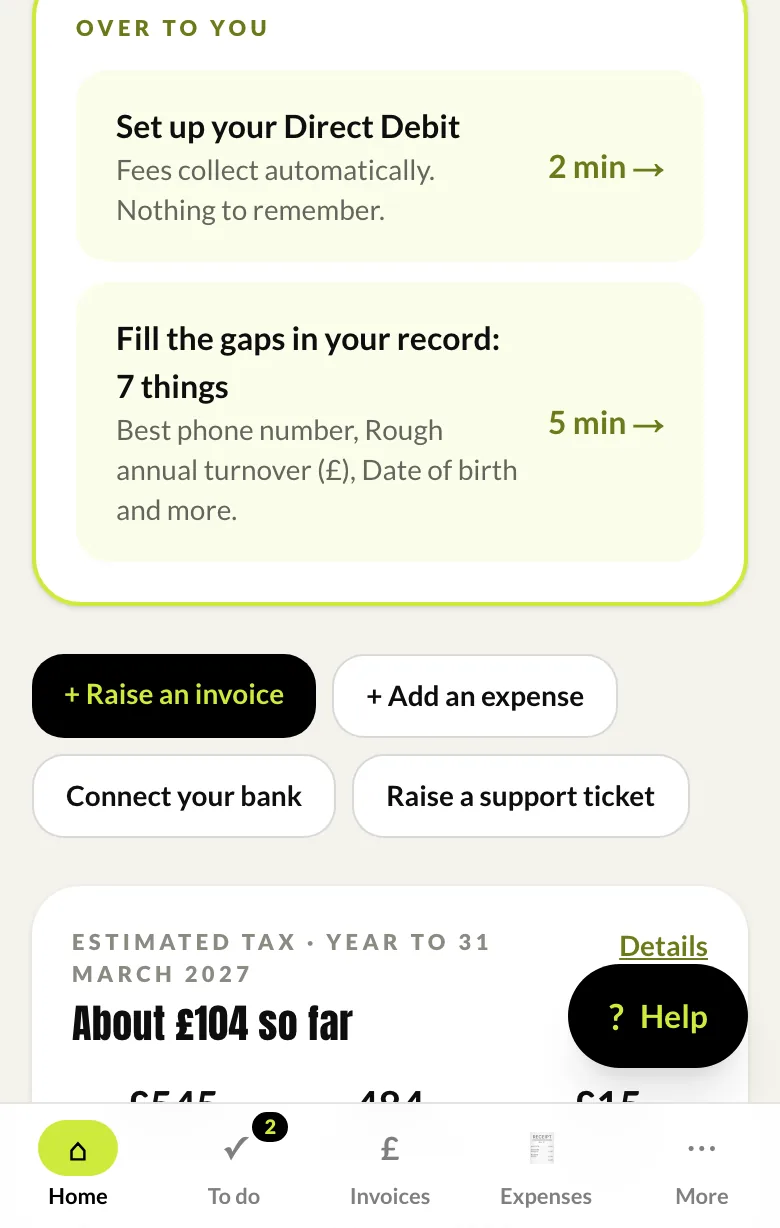
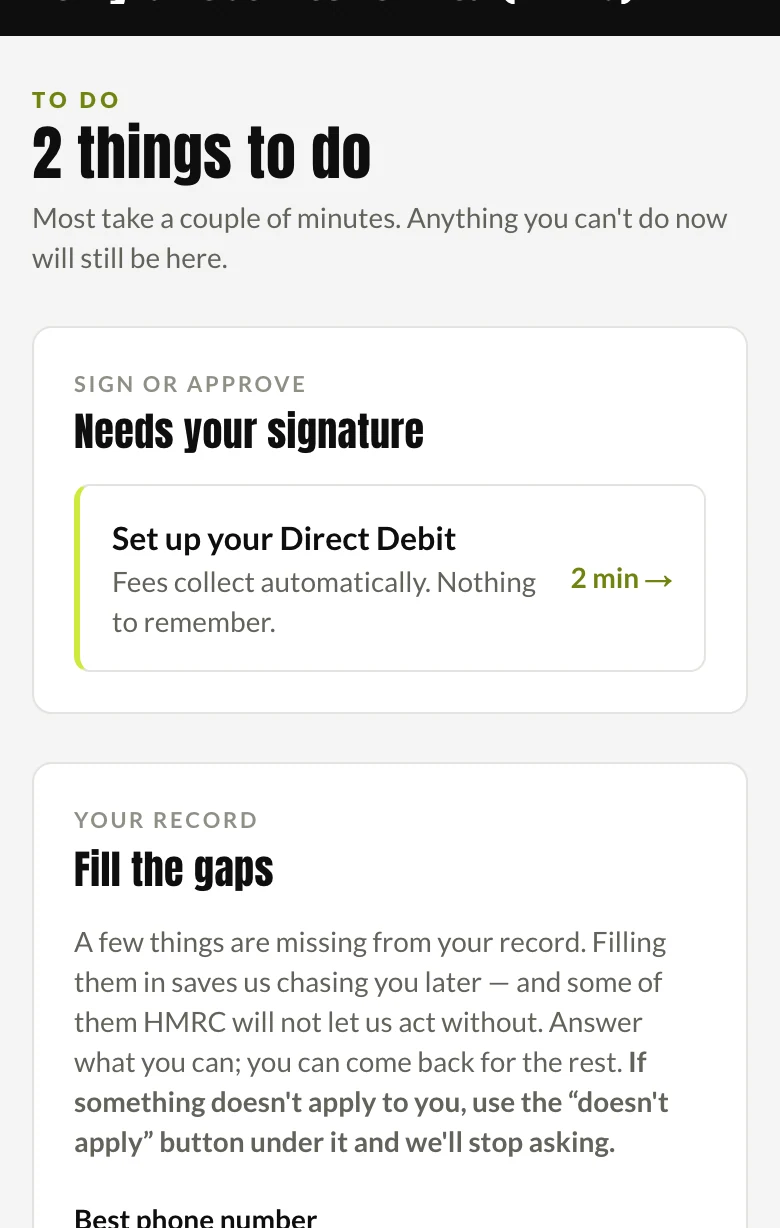
Home: what needs you, and what does not

The home screen is a short list of the things only you can do, with how long each takes, and a set of one-press actions for the things you do most.

Underneath it: the tax building up so far, invoices owed to you, your fees, the next key dates and your team.
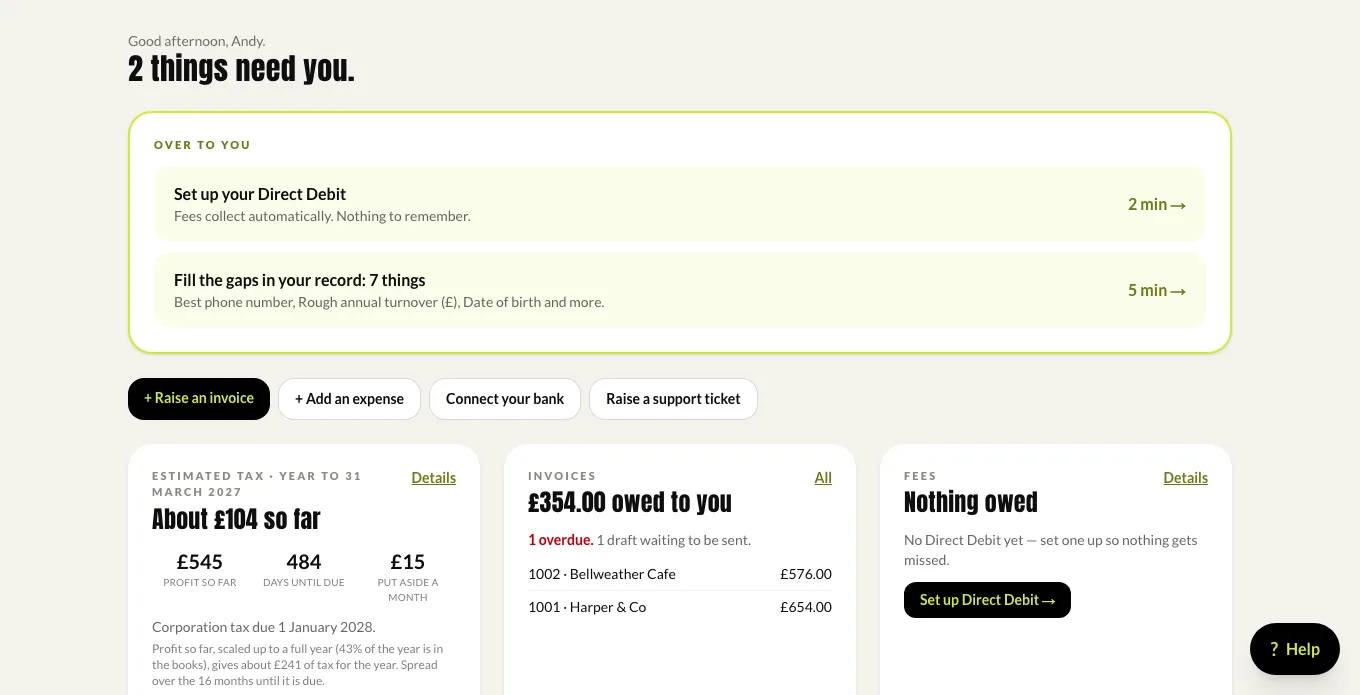
The portal home: two things that need you, then the tax estimate, invoices and fees.

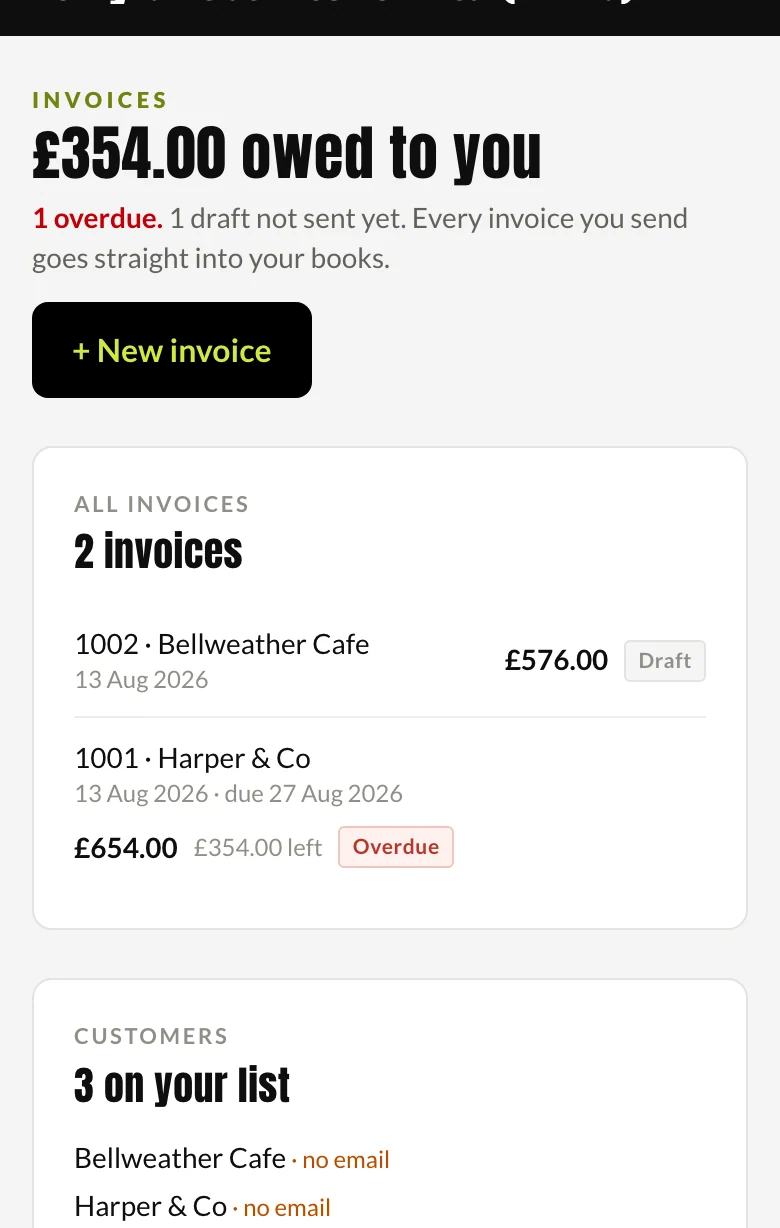
Invoices: raise, send, chase, get paid

Raise an invoice in the portal or the app and it goes straight into your books. Your customer gets an email with the invoice and a page to view or print it, with your logo and bank details on it.

One press sends a polite reminder showing what is still owed. Mark it paid when the money lands, or let a connected bank feed match it for you.
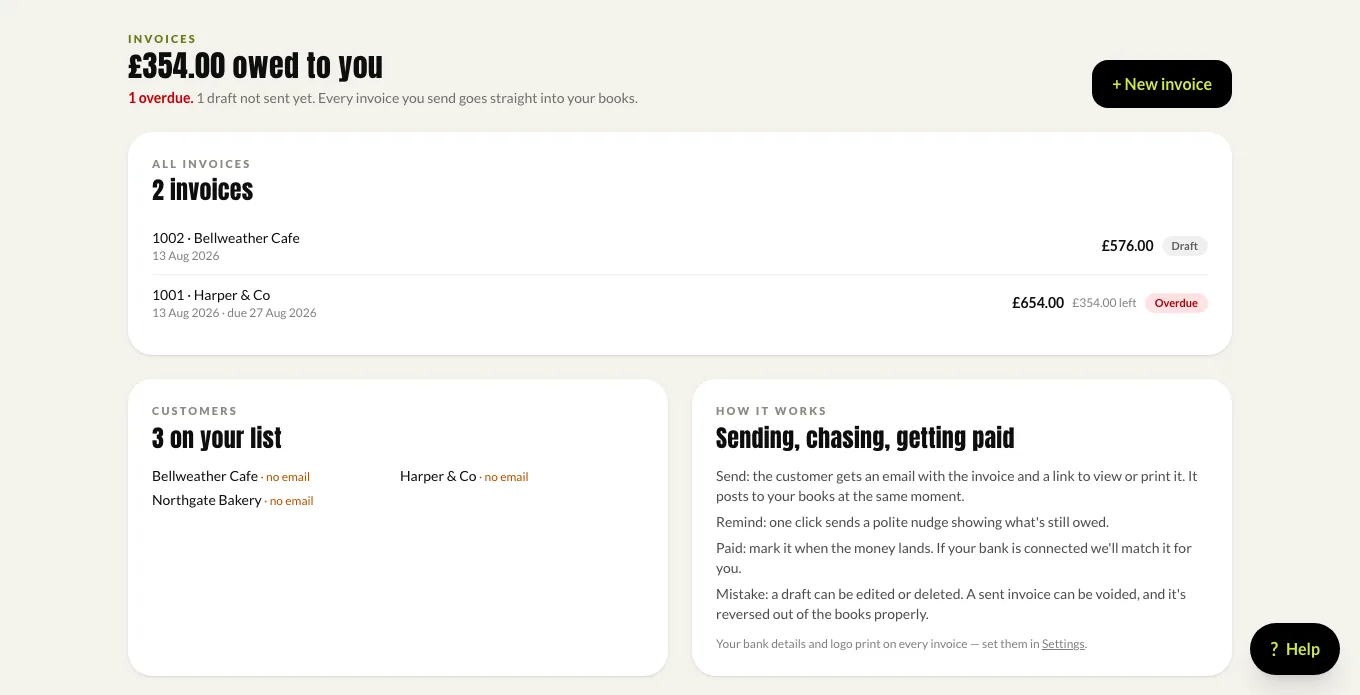
Invoices: what is owed, what is overdue, and the customers on your list.

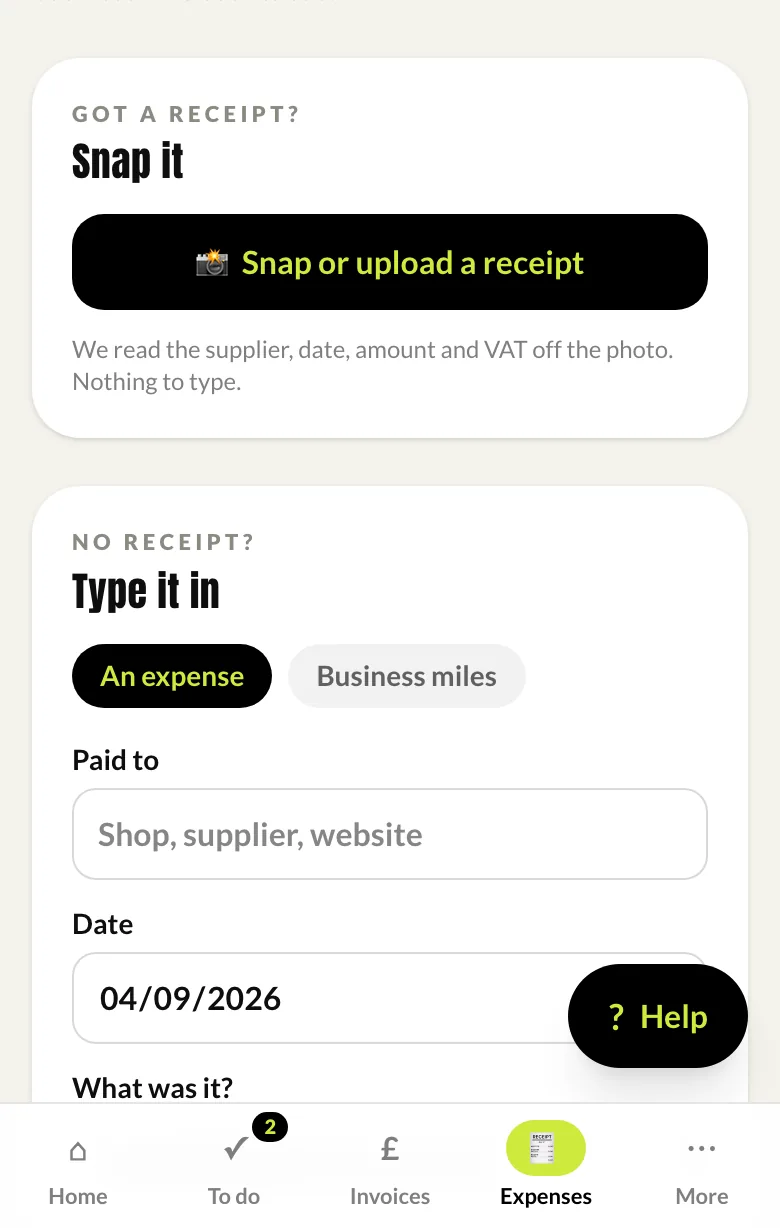
Expenses: snap a receipt, or type it in

Photograph a receipt and we read the supplier, date, amount and VAT off it. No receipt? Type the expense in, or claim business miles at HMRC's rates.

Everything lands in a review queue on our side, so it is checked by a person before it goes into your accounts.
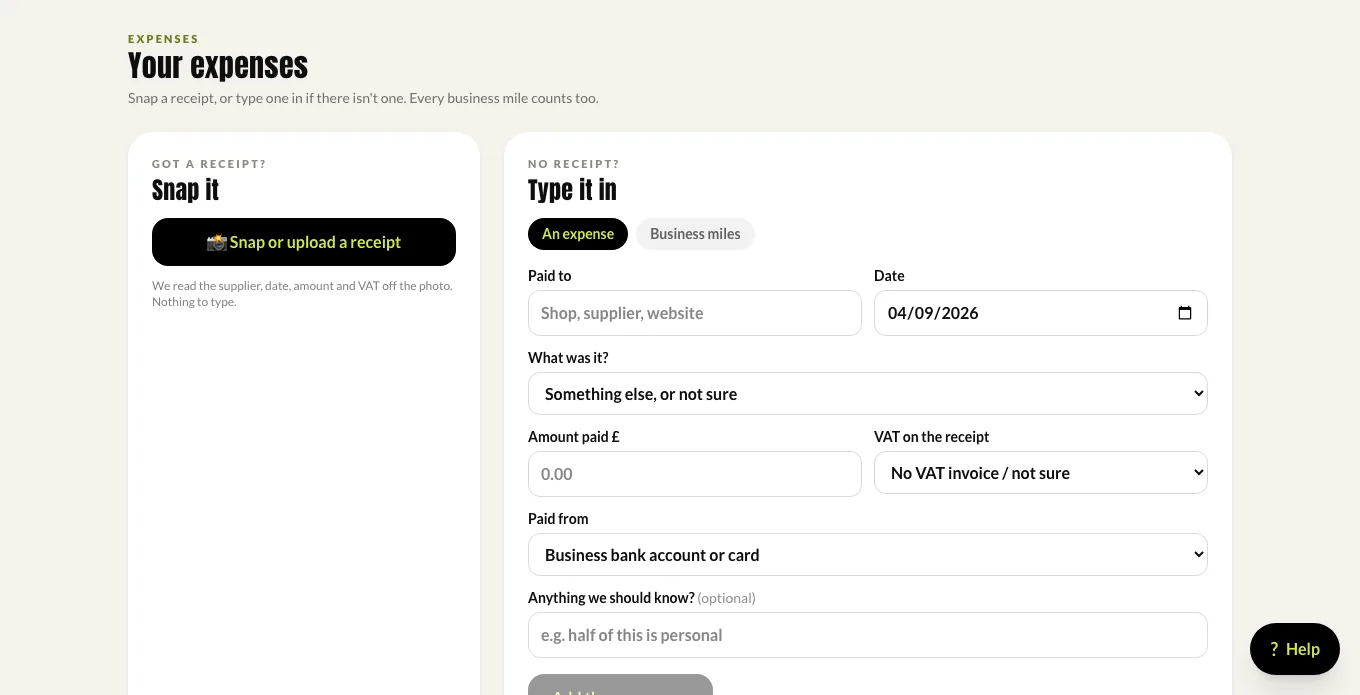
Expenses: snap a receipt or type one in; mileage at HMRC rates.

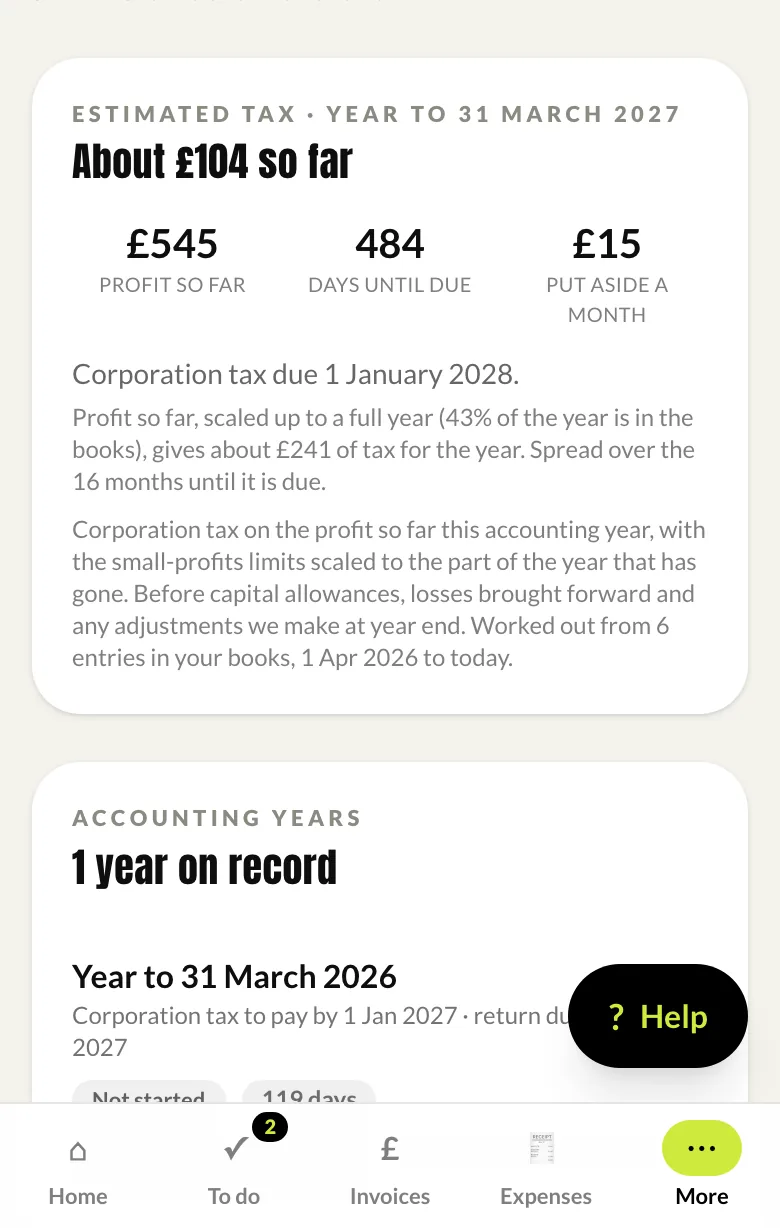
Tax: what is building up, before the year end

An estimate of the tax on the profit so far, when it is due, and what to put aside each month so the bill is never a surprise. It is worked out from your live books, and it says how much of the year it is based on.

Each accounting year shows where we are with it: the accounts, the return, the payment date.
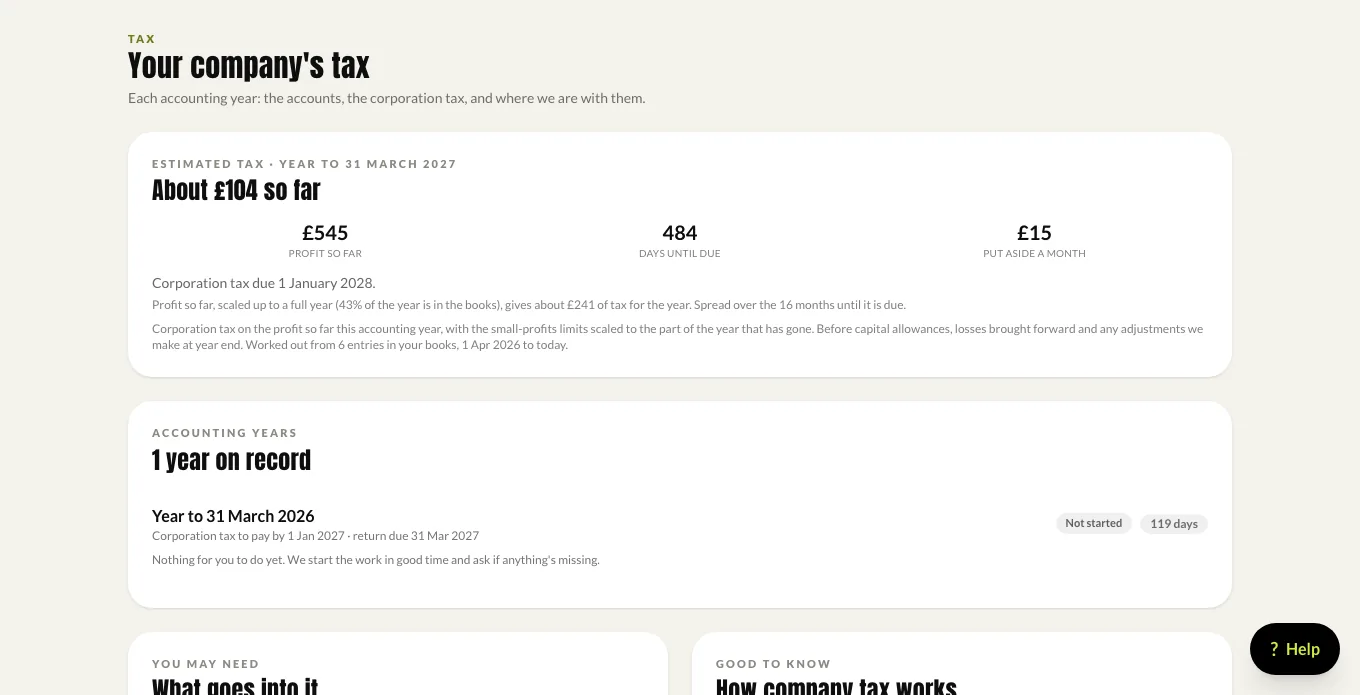
Tax: the estimate so far, days until it is due, and a monthly amount to set aside.

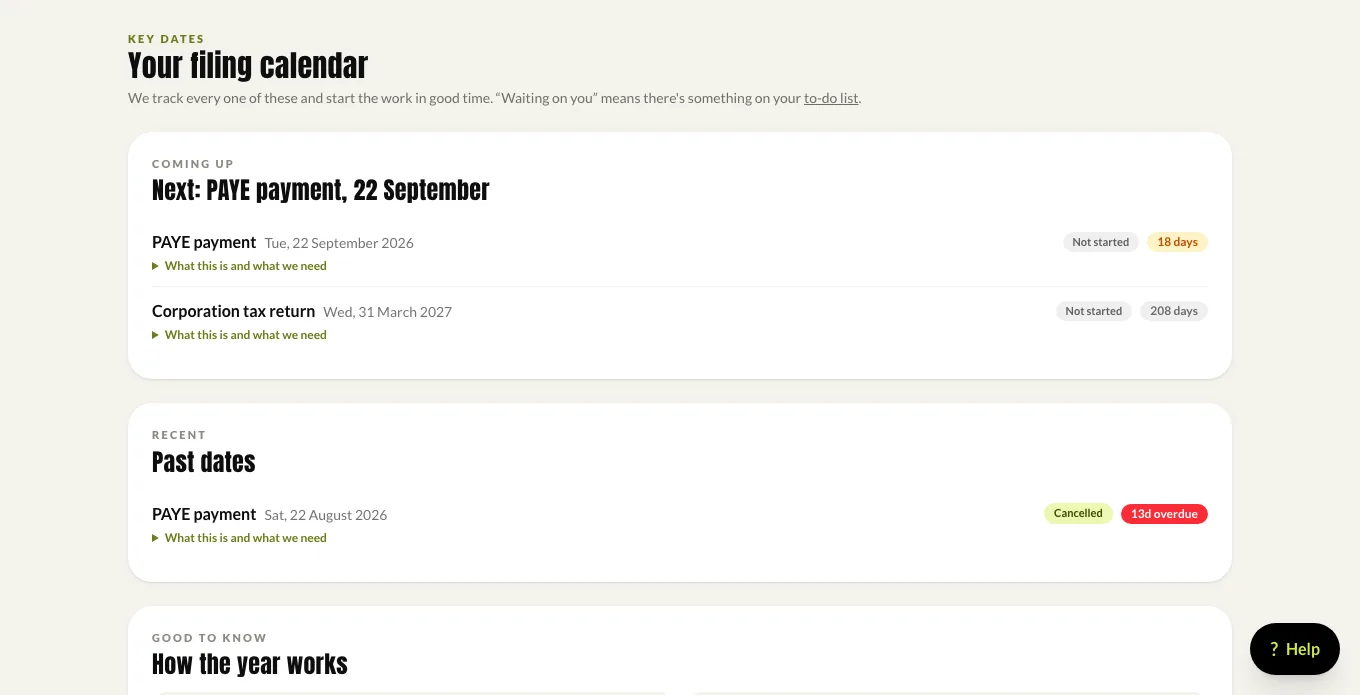
Key dates: the filing calendar

Every deadline that applies to you, what each one is, and who is doing it. Past dates stay on the list showing what was filed and when, so there is a record rather than a memory.

A document cabinet sits alongside it for accounts, returns, letters and anything you upload, and messages raise a ticket with your team so nothing is lost in an inbox.

Key dates: your filing calendar, with what each date is and who is doing it.

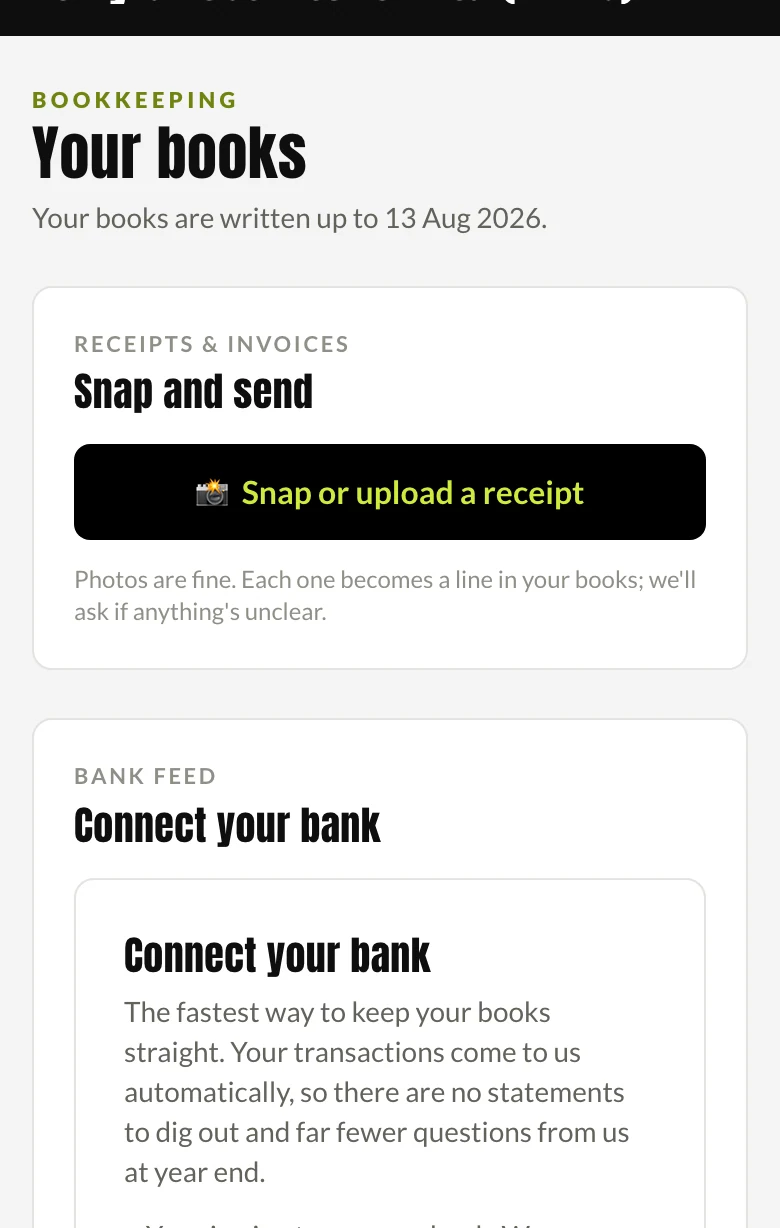
Bookkeeping: how current your books are

The date your books are written up to, in plain English, so you always know whether the numbers you are looking at are worth anything.

Snap and send a receipt from here, connect your bank so transactions arrive on their own, and see which software you are on.
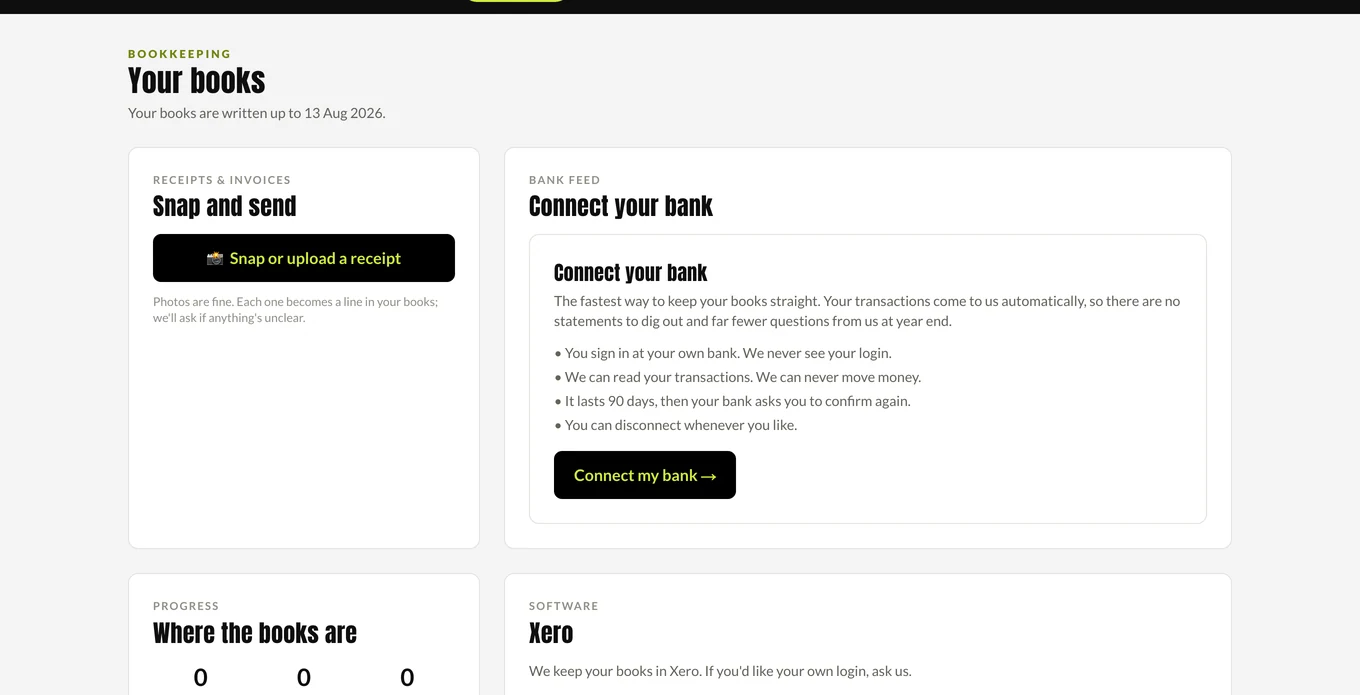
Bookkeeping: how far your books are written up, and the bank feed.

Director tools: the questions only directors ask

Whether the company owes you or you owe the company, what a dividend would cost, and whether salary or dividend is the better way to take the next pound out.

With the three rules that catch directors out, in writing: dividends come out of profit, a loan is not a wage, and an overdrawn loan account has a tax charge on it.
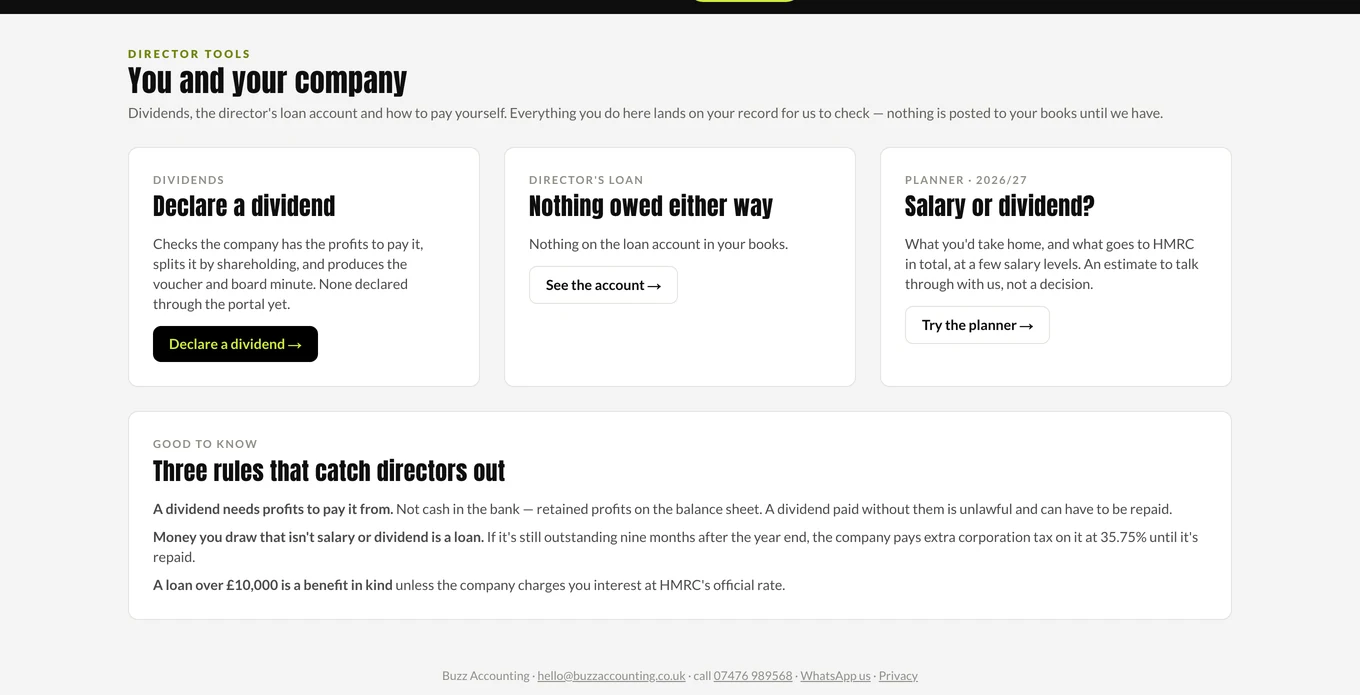
Director tools: the loan account, dividends, and salary versus dividend.

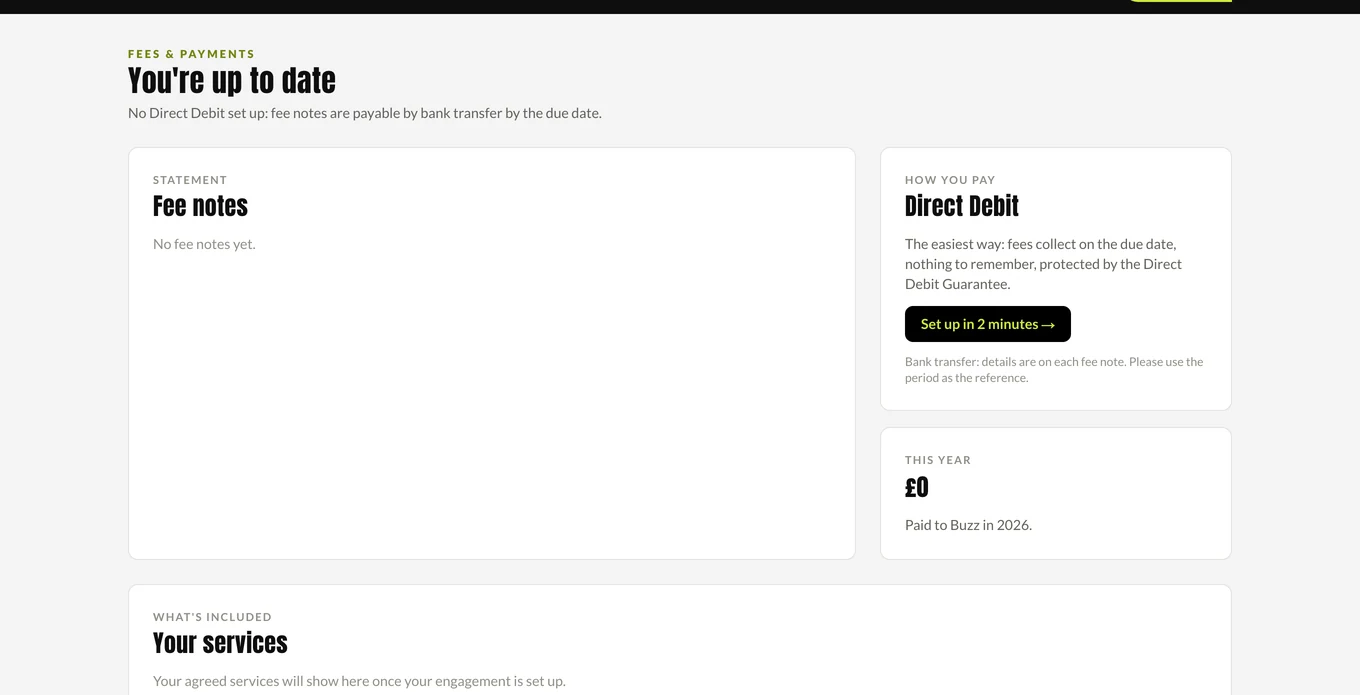
Fees and payments: no surprises

Your fee notes, what is paid, what is due and when it will be collected. Direct Debit is protected by the Direct Debit Guarantee and you see the date before it leaves.

And what you actually have with us, so adding something is a decision rather than a discovery on an invoice.

Fees and payments: what is due, when it collects, and what you have with us.

Your team: the people you actually deal with

The named people looking after you, with a photograph, so you know who you are writing to. Message any of them and the right person picks it up.

Plus the practice details you occasionally need: the company number, the professional indemnity position and who to contact if something has gone wrong.
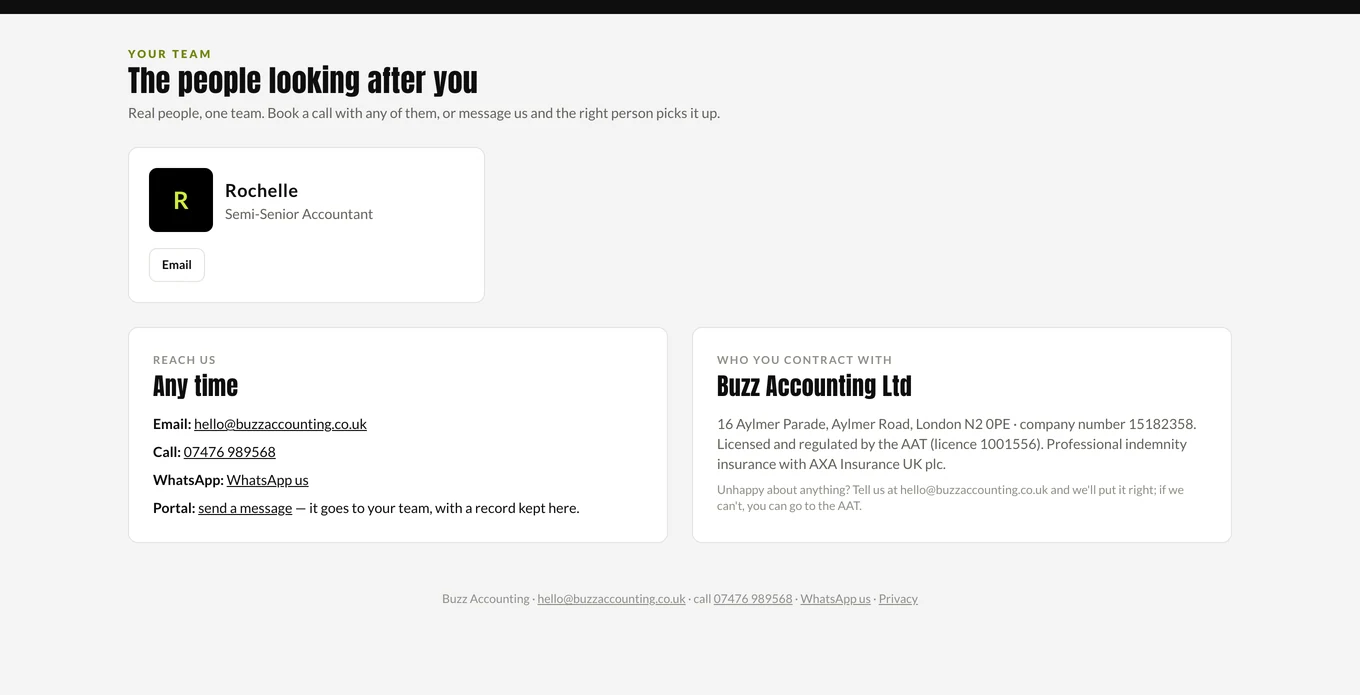
Your team: the named people looking after your account.

The Buzz app

Raise an invoice from the van, photograph a receipt before it is lost, and see what tax is building up. Same account, same team.

The app home screen
The app home screen
Snapping a receipt
Snapping a receipt
The tax estimate on a phone
Invoices on a phone
Invoices on a phone
The to-do list on a phone
How current your books are, on a phone

The part a subscription cannot give you

Every accountant has a portal now. Ours is better than most and it is still the floor rather than the service. These are the five things the subscription does not buy, and they are the reason the fee is a fee for a service rather than for software.

Notice that a number is wrong
Software shows you a figure. It does not know the figure is odd. Someone who has seen your business every month for a year rings you about the margin that has slipped four points — in July, while you can still do something about it.
Make the call with you
A forecast is arithmetic and you can buy arithmetic. Whether to take the lease, make the hire or put the price up is judgement, and it is worth having somebody in the room who has watched other owners make the same decision and seen how it went.
Be accountable for a deadline
A subscription has nobody to answer for a late filing. Here every deadline has a person’s name against it, and what happens when we get something wrong is written down in public on our promise page rather than discovered afterwards.
Grow when you do
Management accounts, a cashflow forecast, coaching for the owner, legal support, financial planning. Most businesses do not need all of it yet. It is already here when you do, with the same people and the same set of figures rather than a new relationship to start from scratch.
Change because you asked
We wrote the software. When a client says a screen is missing something, that is a conversation with the people who build it. If the thing you need is not in there yet, it can be.

Switching is not the risky part

Most owners who are unhappy with their accountant stay another year, and it is rarely about the accountant. It is that moving feels like the risk. Here is what it actually costs you.

The switch is free
The letters, the records, the HMRC authorisations and the software set-up are part of joining, and nothing about them is charged for. The only thing ever quoted separately is catch-up bookkeeping where the books are behind, and you see that figure before anyone starts.
You do one thing
Accept the quote. We write to your old accountant, ask for the handover pack and chase until it arrives. You never have to have the awkward conversation, and a one-line email to them is enough if you want to send one.
You see the fee first
Four questions on the instant quote puts the monthly figure on the screen and the full proposal in your inbox. You do not have to sit through a meeting to find out the price.
Asking costs nothing
There is no clock running. The reason people do not ring their accountant is the fear of the invoice afterwards, and that is the call that would have saved them money.
Nothing locks you in
The file is yours. If you leave you take the records, the history and the software subscription in your own name, and we will not withhold records over a disputed invoice.
Any time of year
There is no window to wait for. A mid-year switch is normal, and which firm finishes the open work is agreed in writing before anything moves, so no filing is left without a name against it.

That is the whole of the downside. Which leaves the only question worth asking: is this better than what you have now? The switching page sets out how the move runs, week by week.

Questions about the portal and app

Is the portal or the app an extra cost?

No. Every client has them, whichever package they are on. There is no software subscription for them.

Can I keep using Xero?

Yes. FreeAgent is included in the fee, and we work in Xero too. The portal sits alongside either.

How do I sign in?

Press Client login at the top of this site, enter your email, and we send a six-digit code. No passwords to remember. The app has its own sign-in.

Can my bookkeeper or business partner use it too?

Yes. Each person on your record can sign in with their own email, and everything they do is logged against their name, so you can see who raised which invoice.

Can customers pay an invoice from the page?

Your bank details print on every invoice, so they pay by bank transfer to your account. We never take your customers' money through our accounts.

Where is my data held?

In the UK, on our own system, Buzz OS, with access limited to the people looking after you. Our privacy policy sets out the detail.


See your fee in a few minutes

The instant quote shows the monthly fee on the page and sends the proposal to your inbox.

Accreditations & Partnerships
Get a quoteBook a call
Chat with us on WhatsApp